I discovered a smarter way
To Make AI Write About Your Ideas, Knowledge and Expertise…
Without EVER making things up!
Dear Friend & Subscriber,
If you’ve ever tried to write with AI…
You probably bumped into two of these big problems.
Problem #1: AI doesn’t sound like you
This one’s actually pretty easy to solve if you stop using ChatGPT and use Claude instead.
Prompt Claude with 3-5 of your best writing samples and tell it: “Please mimic the writing style, voice, and tone of the content attached.”
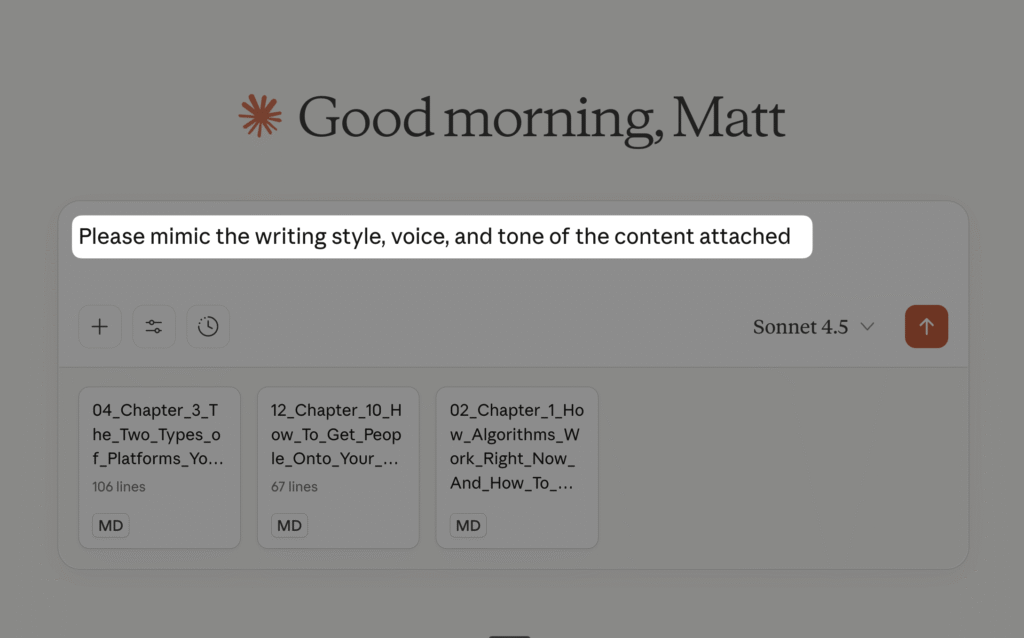
This will get you 90% closer to your style.
That was an easy fix, right?
Problem #2: AI constantly makes things up
This is the big one.
Unless you prompt AI with your exact ideas (which is tedious because you’ll feel like repeating yourself all the time), it will make things up.
You end up in endless back-and-forth:
“No. This is wrong. That’s not what I meant…”
Five different versions later, you’re overwhelmed and exhausted—sifting through thousands of words trying to stitch it all together.
Let’s do the math on what this actually costs you:
You spend 2 hours writing one article because you’re correcting AI, rewriting, and fact-checking.
That’s 8 hours a month if you publish weekly.
If your time is worth $100/hour (and it should be more), that’s $800/month in wasted time.
$9,600 a year.
Most people just accept this as “the cost of using AI.”
But there’s a better way.
Here’s How To Stop Ai Making Things up
The only way to stop AI from making things up is to give it access to ALL your ideas.
By “your own ideas,” I mean something you’ve said in your content, like:
- articles,
- newsletters,
- online courses,
- YouTube videos,
- Substack notes—really, ANY content you’ve ever published.
That way, you could not only brainstorm and create content faster…
But also get AI to a level where it truly saves you time instead of making you repeat everything.
The logical solution would be to paste every content you’ve ever created into Claude.
But depending on how much you’ve published…
You’ll quickly hit three walls:
🚫 Session limit: “Oh shoe– you can’t use Claude for the next 4 hours!”

🚫 Message length limit: You need to start a new conversation from scratch and summarize the old one (=waste of time)
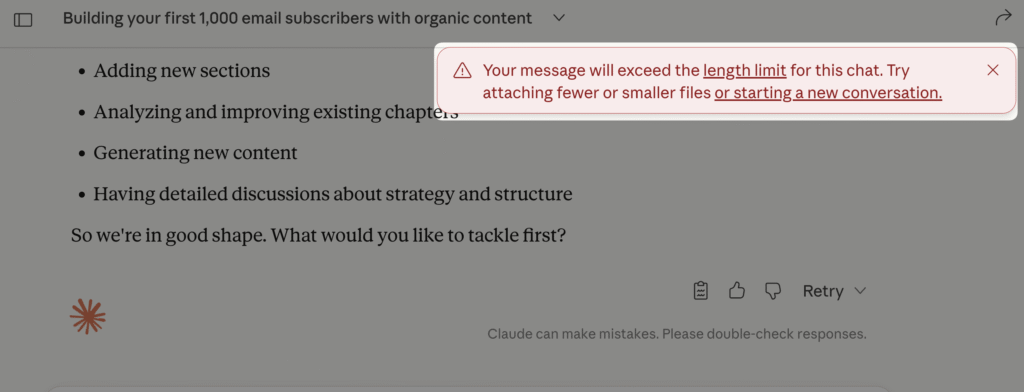
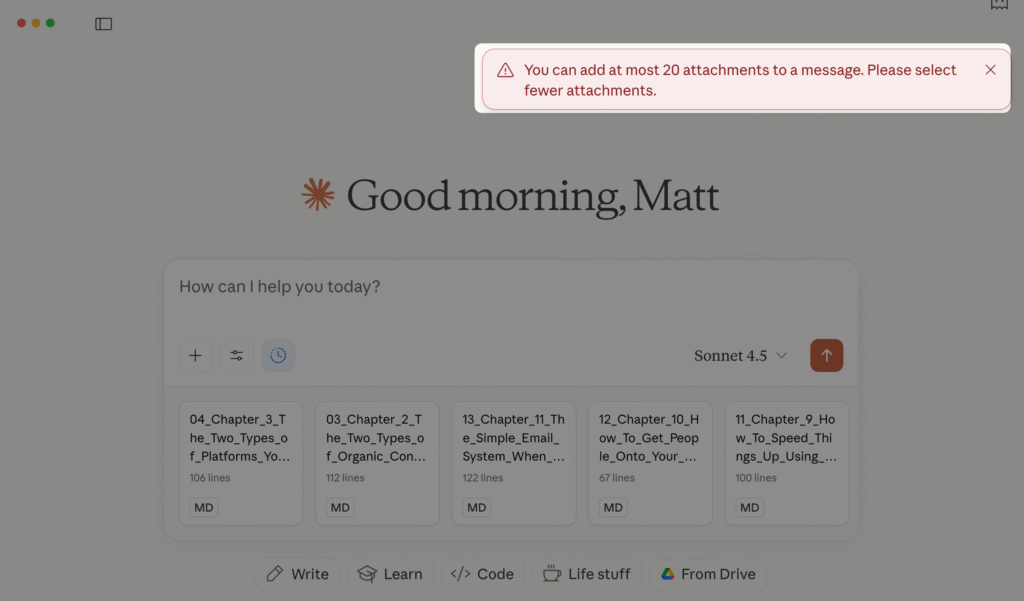
🚫 Attachment limit: You can’t attach more than 20 attachments to one conversation.
These also come with another issue:
Copying & Pasting and trying to keep everything up to date.
Because let’s face it:
How fun is it to constantly keep moving files?
Each piece of content you put out there becomes a new friction point.
This is where most people give up and go back to manually editing everything.
A Content Base™ Solves This Problem
Think of it like this:
When you paste files into Claude, it’s like handing someone the keys to a giant library and saying, “Only pull relevant facts about WW2.”
But Claude has to hold everything in its immediate attention. That’s why you hit limits. That’s why it mixes things up.
A Content Base works differently.
It’s like giving Claude a library card instead of the entire library. You tell it which aisle to look up, what book to pick, and what to leave.
All your content lives in an organized system outside the chat conversation.
When you want something from Claude…
Claude connects to your Content Base, searches the relevant parts, pulls the specific idea it needs, and brings it back to the conversation.
You never hit the three walls mentioned earlier because:
- Your content isn’t clogging up the conversation
- Claude only pulls what it needs when it needs it
- The library can hold unlimited content (10 articles or 100,000—doesn’t matter)
This is how you can give AI access to everything you’ve ever written without running into limits.
See It In Action
✅ Use case 1: Write more content that sounds like you
✅ Use case 2: Write the book you’ve dreamt of in one morning:
✅ Use case 3: Get accurate content ideas and outlines when you feel like feces
✅ Use case 4: Write SEO-optimized posts in 4 minutes
You Can Now Have
your own Content Base
In Just A Few clicks
I’ve built a tool that does exactly that.
- It stores everything you’ve ever said in your articles, emails, videos, podcasts…
- Automatically saves everything you’ll publish in the future
- Lets Claude (or any AI) search it instantly
You do this once, and then it runs automatically in the background without you having to think about it.
How This Will Save You
HOURS Each Week
Instead of spending 2 hours correcting AI on a single article, you’ll write it in 20 minutes. Because Claude stops making things up and starts pulling from YOUR actual ideas.
Once it’s running, here’s what becomes possible:
👉 Build Your Audience Faster:
✅ Weekly newsletters in 10 minutes – “Write my newsletter about [topic]” and Claude finds your best stories and frameworks from everything you’ve published
✅ Never run out of content ideas – “Give me 10 article ideas about [your expertise]” and Claude pulls from your actual knowledge, not generic AI advice
✅ Repurpose without repeating yourself – “Turn my article into 5 LinkedIn posts and 3 YouTube scripts” and Claude knows what you’ve already said
✅ Draft Substack articles, SEO posts, & social posts in 10 minutes – “Write an SEO article for keyword [X]” using your actual examples and opinions, not invented ones
👉 Create Products You Can Sell:
✅ Launch that course – “Create a course outline on [topic]” and Claude organizes your existing content into modules instead of you staring at a blank page
✅ Write a KDP book in days – “Give me a book outline based on my framework for [topic]” and Claude structures everything you already know into chapters
✅ Build lead magnets in minutes – “Create a lead magnet that attracts buyers for [offer]” and Claude knows your positioning and gives you something you can publish in an hour
You Could Keep Spending Hours Correcting AI…
or You Can Give It Access to Your Content Base
Here’s Everything You Get:
✅ Content Base App – $199 value
✅ Step-By-Step Video Setup Guide
✅ Automation Training (With Ready Workflows) – $99 value
✅ 30-Day Email Support – $99
✅ Future Updates & Improvements – $99
Total: $496
Your Purchase is Backed By 2 Risk-Free Guarantees:
Test it for yourself for the next 90 days:
🏅 Guarantee #1 🏅
Cut Your Writing Time In Half Or Pay Nothing
If you’re not writing content in half the time, g et a full refund.
🏅 Guarantee #2 🏅
0% Hallucination Guarantee
If AI still invents information instead of pulling from YOUR actual content, get a full refund.
Questions & Answers
👉 How is this different from Claude or ChatGPT Memory?
The built-in memory is limited to what you say in your chats.
This comes with two issues: first, you’re platform dependent.
Second, So let’s say you’re publishing Notes on Substack or you’re posting something on your blog.
Claude/ChatGPT does not have access to it.
The Content Base is like having access to your entire brain from the last 5 years. If you’ve published 100 articles, Claude/ChatGPT Memory knows ZERO of them unless you manually tell it.
The Content Base knows ALL of them automatically.
Also, it allows you to easily switch between different models and avoids you getting locked in to ONE LLM specifically.
👉 I am not a technical person. Can I make this work?
Yes, because I’m providing you click-by-click detailed video instructions. But if you’d like more handholding, you can buy a separate installation package where we’ll meet on Zoom and do it together ($99).
👉 Can I also use this with ChatGPT?
Yes.
👉 What am I buying exactly?
You’re buying a full app that will allow you to store your ideas and connect them with AI to create content faster.
👉 How much does it cost?
The app is $199. One-time.
Hosting is ~$6/month. (You can pause it anytime)
👉 Is my data safe?
Yes. Content Base is a search tool that sits on top of your existing content. Your original notes, emails, and files stay wherever you already keep them. Content Base just makes them searchable with AI.
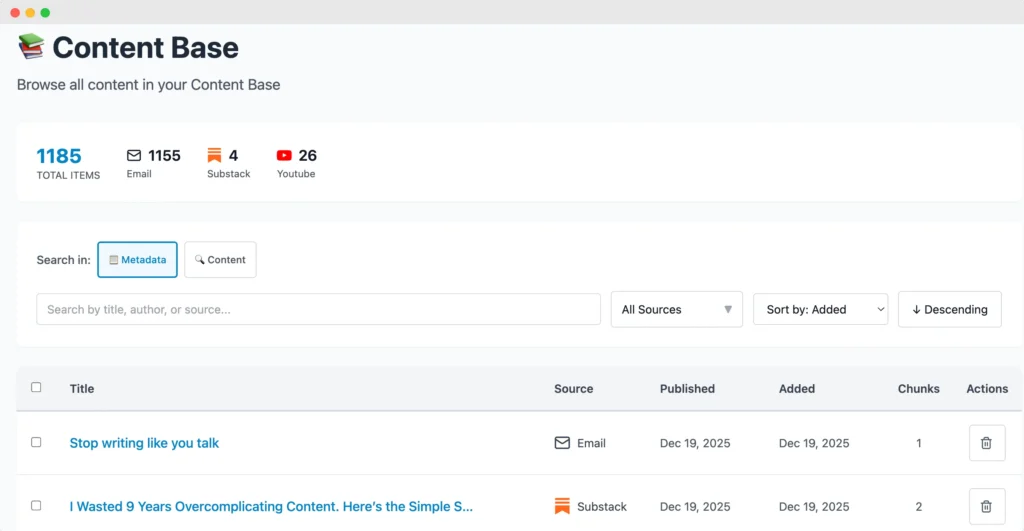
👉 Can I see what’s in my Content Base?
Yes. Your dashboard shows everything you’ve added, organized by source type like so:
👉 How do I add content to my base?
You can import your content in 3 ways:
1/ Upload directly from the interface (drag and drop)
2/ Copy/paste directly from the interface
3/ Automation tools like Zapier, Make, n8n, Activepieces – you’ll also get a free training + templates on how to set this up.
👉 Any other questions?
Shoot me an email [email protected]
What others say: